

Privacy in SmartPOS Shopper: what is stored about you
SmartPOS Shopper keeps only what it needs to connect you with the stores you choose: your e-mail, name, optional phone, your memberships, carts, chats and receipts. Each store sees only your membership with that store. This page explains what is stored, what stores see, how location is used, and the privacy controls you have in the app.
What does the app store about you?
Section titled “What does the app store about you?”In the app’s own words: “Your e-mail, name, optional phone, your store memberships, carts and inbox.” In detail:
| Data | Why it is kept |
|---|---|
| To sign you in with a code and send receipts or updates you asked for | |
| Name | Shown to stores on receipts and bookings |
| Phone (optional) | Only if you add it: stores can reach you, and text messages become possible |
| Country, city, area, address, profile photo | Only if you add them: for Find stores and your profile |
| Store memberships | Which stores you joined, and whether they approved you |
| Carts | Your Scan & Go and order carts per store |
| Gift cards you add to Wallet | So you can pay with them; “Only you see your cards.” |
| Chats with stores | Your conversations, including photos you sent |
| Notifications inbox and your notification choices | Receipts, order updates and replies, and how you want them |
| Language and appearance | Your app settings |
What can a store see about you?
Section titled “What can a store see about you?”When you join a store, that store gets a customer record for you in that store only:
- your name, e-mail, and phone if you added one;
- what you buy there (sales, receipts, returns, balance, reward points);
- your orders, bookings and chats with that store.
A store never sees your memberships, purchases, chats or wallet at other stores. If a store already had you as a customer with the same e-mail, your membership is linked to that existing record. Phone numbers are never used to link you to someone else’s record.
How is your location used?
Section titled “How is your location used?”- Near me in Find stores asks for your location only when you tap it.
- It is used once to sort that search by distance, rounded, and not saved or shared with stores.
- If you deny location, Find stores still works with country, city and search.
Privacy controls in the app
Section titled “Privacy controls in the app”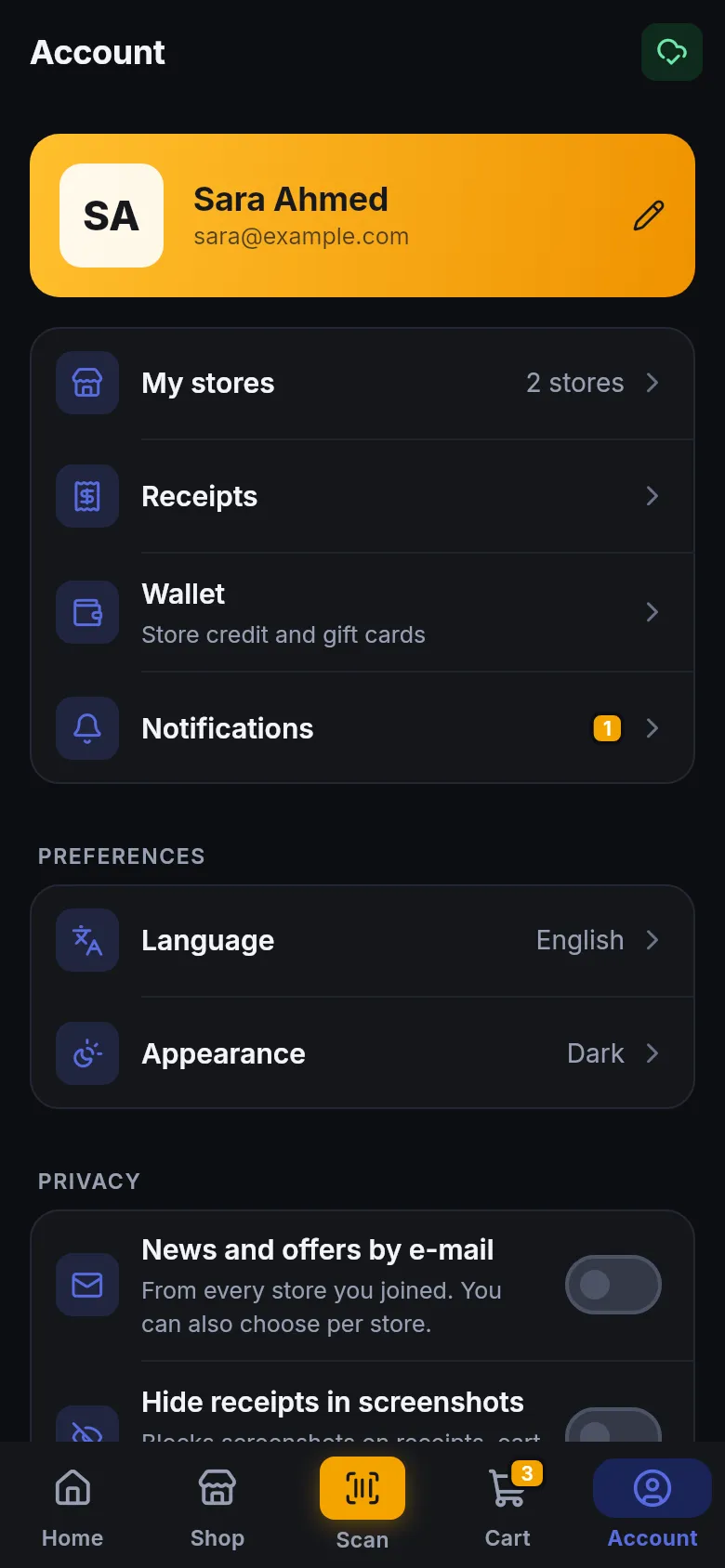
| Control | Where | What it does |
|---|---|---|
| News and offers by e-mail | Account › Privacy | “From every store you joined. You can also choose per store.” |
| News and offers by e-mail (per store) | Store page, or Send me news and offers from this store when joining | Just that one store |
| Hide receipts in screenshots | Account › Privacy | Blocks screenshots on receipts, cart and account pages |
| Notification settings | Account › Notification settings | Phone, e-mail and SMS per type, per store, or mute a store. See per-store notifications. |
| Block a store in chat | Chat › More › Block this store | The store can no longer answer you there. See Message a store. |
| Leave this store | Store page | Ends that membership |
| Delete my account | Account | Removes your account for good. See Delete your account. |
How is your account protected?
Section titled “How is your account protected?”- No password: each sign-in uses a fresh code that works once, for 10 minutes.
- Your store card QR works in one store, once, for 3 minutes. See why the code changes.
- Invoice links you share are valid for 30 minutes.
- Photos you upload are re-saved by the system, which strips hidden details such as GPS position.
Privacy policy and data requests
Section titled “Privacy policy and data requests”- Full privacy policy: smartposhub.com/legal/privacy
- Ask for your data to be deleted without the app: data request form
- Questions: contact SmartPOS Hub support
For questions about what a particular store does with your purchase history, ask that store, because each store manages its own customer records.
Frequently asked questions
Section titled “Frequently asked questions”What does SmartPOS Shopper store about me?
Your e-mail, name, optional phone, the profile details you add, your store memberships, carts, saved gift cards, chats and your in-app inbox. You can delete all of it at any time by deleting your account in Account.
Can stores see my purchases at other stores?
No. Each store sees only your membership with that store and what you bought there. Your purchases at different stores come together only in your own app.
Is my location saved when I use Near me?
No. Near me reads your rough location once to sort that search by distance. It is rounded, not saved to your account and not shared with stores.
Will stores send me marketing e-mails?
Only if you agree. News and offers by e-mail is off unless you switch it on, either for every store under Account › Privacy or for one store on its store page or when joining.
Can I see what a store has on record for me?
Yes, the main part. Open the store page and tap My account here to see your balance due, reward points, purchases, payments and returns at that store for the last 12 months. For anything else, ask the store directly.
Are my chat photos and profile photo safe?
Photos are checked and saved again by the system before they are stored, which removes hidden details such as the place a photo was taken. Chat photos are only shown to you and the store you sent them to.
Can a store message me without my permission?
Stores can't start a chat with you in the app. Only you can start a chat with a store. Stores can send you order, booking and receipt notices, and you choose how you get those in notification settings.